3ds Max | All

Affinity Priority Switch

2 votes

This simple switch can decrease/increase Affinity for 1 thread. Also it changes priority to low/normal.

To install just drag-n-drop into 3dsMax viewport. Then look at the NikScripts category -> Priority switch.

Checked state of button on toolbar means - low priority, thread 0 disabled.

Unchecked state - normal priority and all threads enabled.

CopyPaste

8 votes

This maxscript allows you to copy a selected vertex into a clipboard and later paste. There are two versions of the maxscript - simple and advanced. Simple let's you copy and paste a single vertex's x -y - and z coordinates. The Advanced version let's you specify which dimension to paste (x -y - or z) and also can paste a single dimension value into several selected vertices.

Key Mover

5 votes

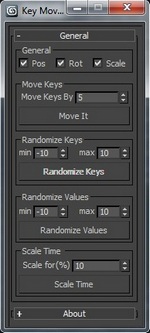
Key Mover MaxscriptUpdated: Some things changed and fixed.

Key mover is a script for keyframe's manipulation in 3ds max on one or more animated 3D objects at the same time. You can also perform key`s time and values randomization on multiple objects at once.

by Albero Art

VrayIES Presets

5 votes

This is my own script, it help lighting with vray ies more easy and faster.

Key features:

- Quick assigned 30 nice IES to vray light.
- IES folder browser and quickly assign to vray light.
- Change VrayIES and Vraylight settings as a group or individually.
- Fast create VrayIES light use geometry shape.
- Create VrayPhysical Camera from Perpective view.

Hope you guys enjoy, I'm still using it and it help me alot!

Install: Extract & copy all file to Script folder. Run script VrayIES_Presets.ms or just drag and drop it to max viewport.

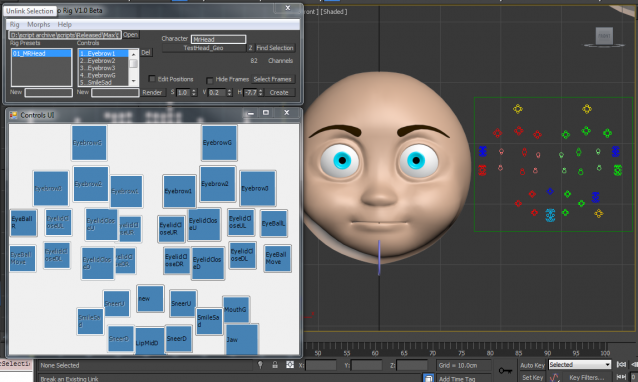
Sal Facial Auto Rig

1 vote

Sal Facial Auto Rig V1.0Beta
Sal Facial Auto Rig provide fast and easy way to create facial rig in 3Ds Max, all you have to do is to create your morphs and connect them to your setting file and your rig will be ready in seconds

MB Collapse

30 votes

Macroscript (without user interface) that will accurately collapse (bake) any transformation (position, rotation, scale) into keyframes (one keyframe per frame for the current animation range). Unlike the built-in tools, this works for any kind of controller as well as for parented objects (which will be unlinked afterwards).

v0.3 update:

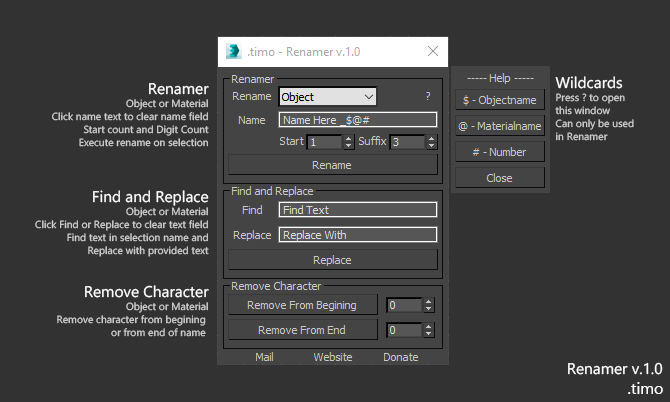
.timo - Renamer

1 vote


Renamer for 3dsMax

Renamer allow you to quick Rename one or multiple object using custom settings that is provided

How to use:

1. Select Object\s

2. Fill in requred text

3. Execute

Installation: Drop The file in max viewport and go to Customize ==> Customize User Interface ==> Category: .timo ==> .timo Renamer

Tested on 3ds Max 2015

Conform to Spline

22 votes

This script allow you conform(snap) selected verticies to a spline

VrayHDRI, Bitmap and Proxy: Asset Path Search and Replace

1 vote

A script which walks through all VrayHDRI (Domelight), VrayHDRI Texturemaps in Materials, Bitmaps and VrayProxys to perform a search and replace on the assets path.

If you want to change the assets path drive letter for example...

UDIM Maxscript help tool

2 votes

It’s a Maxscript tool for working with multi tile textures with 3ds Max 2016 and below.

ayyy

New version v.02!
Updated: 2017.11.16

Changes:
- Added set Bump option
- Fixed a bug when there are less than 10 material the self-illim and bump setter rised an error

Purpose of the script:
– When you work with multi tile texturing with older Max than 2017 there is no way to deal with the texturing fast.

What it does:

Syndicate content