
V-RayMax Converter PRO

V-RayMax Converter PRO is the best tool for convert 3d scene (materials, maps, lights, cameras, proxies, modifiers, helpers, render elements, etc.) from other render engines to V-Ray and from V-Ray to Corona Renderer, and also for converting V-Ray and Corona materials to Standard|Physical|PBR|OpenPBR materials and to glTF Material.
Current version: 4.0062
Supported for conversion: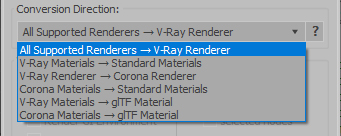
- Standard (Default Scanline)
- Corona Render
- FStorm Render
- Octane Renderer
- finalRender
- Arnold
- Brazil_Advanced (RS v 1.2) material
- NVIDIA iray (unofficial) material.
- Standard / Physical / PBR / OpenPBR materials
- Corona Renderer
- glTF Material (3ds Max 2023 or later)
- Standard / Physical / PBR / OpenPBR materials
- glTF Material (3ds Max 2023 or later)
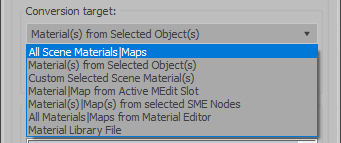
Full list of supported conversions.
Main features:
- Converts materials, maps, lights, cameras, modifiers, helpers and GI environment from other render engines to V-Ray and from V-Ray to Corona
- Converts clouds from CoronaSky to VRaySun and vice versa.
- Converts Night Sky system (Moon, Stars & Milky Way) from V-Ray to Corona and vice versa
- Converts Render Elements to V-Ray (currently supported Scanline RE, Corona RE, FStorm RE, Octane RE) and from V-Ray to Corona
- Converts V-Ray and Corona materials to Standard (Default Scanline) materials
- Converts VRayMtl and CoronaPhysicalMtl materials to Physical Material and OpenPBR Material
- Converts V-Ray and Corona materials to glTF Material (which is necessary for exporting to the .glb for corresponding 3d software: Blender, Gestaltor, Babylon.JS etc).
- Converts proxies (currently supported from Corona, FStorm, Octane) to V-Ray Proxy (static and animated)
- Converts V-Ray Proxy to Corona Proxy (static and animated)
- Converts standard Bitmaps to VRayBitmap and vice versa
- Converts standard Bitmaps to CoronaBitmap and vice versa
- Converts 3ds Max Physical cameras to V-Ray Physical cameras and vice versa
- Automatic configure ACEScg workflow in V-Ray
- Batch processing for multiple 3dsMax Scene (*.max) or 3dsMax Material Library (*.mat) files
- Programmatically interact with most converter functions using built-in maxscript methods (API), which allows you to use the converter without UI and in combination with other 3rd-party scripts.
- ...and more additional tools for fixing and adjusting the scene.
More detailed information about the all features and capabilities of the "V-RayMax Converter PRO" can be found here: https://maxtools.3dzver.com/product?id=1
Also, on this V-RayMax Converter telegram channel, you can read about all the updates.
IMPORTANT: To convert between different rendering engines, it is necessary that these rendering engines are installed (alpha/beta/dailybuilds/rc versions are not supported).
PS: Please, respect the developers and other users - do not post promotional messages in comments (ie spam).
If you have any suggestions or comments related to the work of the plugin, use the support form at this webpage: https://maxtools.3dzver.com/mxtsupport
- Scripts
- ACEScg
- autodesk material to vray material
- brazil
- conversion
- convert render elements
- converter
- converting
- Corona
- corona to standard
- corona to vray
- finalrender
- iRay
- Material
- Material Converter
- material converting
- PBR
- Physical
- renderer
- revit
- sRGB
- standard to vray
- v-ray
- VRay
- vray material converter
- vray to corona
- vray to standard
- vray to standard material
Comments
Thanks for your help. It
Thanks for your help. It works
During the installation you
During the installation you must indicate the folder, into which is installed 3dsmax 2008 (for example D:\3dsMax2008). After installation in the folder (your 3dsmax folder)\Scripts in you must appear folder 3DZverTools\VRayMtlConverter\ with all necessary files.
Further follow these instructions:
1: After installing run 3dsmax, in the Customize dialog go to the "3DZverTools" category.
2: Drag the "VRayMtlConverter v2.5" into any desired toolbar or put it in a quad menu.
3: Use this tool.
Hello i'm new in this forum
Hello i'm new in this forum and i have some questions. How can i install this script; I use Vray SP1 with 3ds Max 2008 but when i tried to open the script give me an error
can't open file filein "$scripts\3DZverTools\VRayMtlConverter\VRayMtlConverter_v25.mse"
I will give that a try.
I will give that a try. Thanks for the suggestion.
I'm also thinking that they could simply convert the Brazil file to Standard, then I convert from Standard to Vray. I would lose some of the features of the brazil materials, but at least they would show up with texture links in place.
Yes, someone would need to
Yes, someone would need to have both plugins in order to make the translation work.
You could probably just install the demo of either Brazil or VRay and run the conversion then...
So here is the question. The
So here is the question. The company I work with has Brazil but not Vray. I have Vray but not Brazil. Is there any way for me to translate from Brazil --> Vray? I can't figure out a way to get this done without one of us having both Plugins. Is that right?
Yes, that makes perfect
Yes, that makes perfect sense... Now. I'll have to figure out how to get a clean transfer from other the other company.
Thanks for your help.
2Stain777: Yes. It is
2Stain777:
Yes. It is logical, not so whether?
Otherwise, how the script can understand that to it to do?
I see. So, for it to work
I see. So, for it to work you need to have to have both Vray and Brazil?
At you should be installed
At you should be installed Brazil Render plugin.