
V-RayMax Converter PRO

V-RayMax Converter PRO is the best tool for convert 3d scene (materials, maps, lights, cameras, proxies, modifiers, helpers, render elements, etc.) from other render engines to V-Ray and from V-Ray to Corona Renderer, and also for converting V-Ray and Corona materials to Standard|Physical|PBR|OpenPBR materials and to glTF Material.
Current version: 4.0062
Supported for conversion: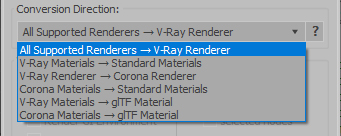
- Standard (Default Scanline)
- Corona Render
- FStorm Render
- Octane Renderer
- finalRender
- Arnold
- Brazil_Advanced (RS v 1.2) material
- NVIDIA iray (unofficial) material.
- Standard / Physical / PBR / OpenPBR materials
- Corona Renderer
- glTF Material (3ds Max 2023 or later)
- Standard / Physical / PBR / OpenPBR materials
- glTF Material (3ds Max 2023 or later)
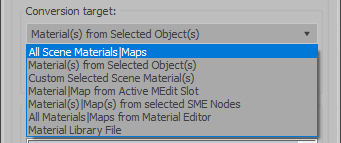
Full list of supported conversions.
Main features:
- Converts materials, maps, lights, cameras, modifiers, helpers and GI environment from other render engines to V-Ray and from V-Ray to Corona
- Converts clouds from CoronaSky to VRaySun and vice versa.
- Converts Night Sky system (Moon, Stars & Milky Way) from V-Ray to Corona and vice versa
- Converts Render Elements to V-Ray (currently supported Scanline RE, Corona RE, FStorm RE, Octane RE) and from V-Ray to Corona
- Converts V-Ray and Corona materials to Standard (Default Scanline) materials
- Converts VRayMtl and CoronaPhysicalMtl materials to Physical Material and OpenPBR Material
- Converts V-Ray and Corona materials to glTF Material (which is necessary for exporting to the .glb for corresponding 3d software: Blender, Gestaltor, Babylon.JS etc).
- Converts proxies (currently supported from Corona, FStorm, Octane) to V-Ray Proxy (static and animated)
- Converts V-Ray Proxy to Corona Proxy (static and animated)
- Converts standard Bitmaps to VRayBitmap and vice versa
- Converts standard Bitmaps to CoronaBitmap and vice versa
- Converts 3ds Max Physical cameras to V-Ray Physical cameras and vice versa
- Automatic configure ACEScg workflow in V-Ray
- Batch processing for multiple 3dsMax Scene (*.max) or 3dsMax Material Library (*.mat) files
- Programmatically interact with most converter functions using built-in maxscript methods (API), which allows you to use the converter without UI and in combination with other 3rd-party scripts.
- ...and more additional tools for fixing and adjusting the scene.
More detailed information about the all features and capabilities of the "V-RayMax Converter PRO" can be found here: https://maxtools.3dzver.com/product?id=1
Also, on this V-RayMax Converter telegram channel, you can read about all the updates.
IMPORTANT: To convert between different rendering engines, it is necessary that these rendering engines are installed (alpha/beta/dailybuilds/rc versions are not supported).
PS: Please, respect the developers and other users - do not post promotional messages in comments (ie spam).
If you have any suggestions or comments related to the work of the plugin, use the support form at this webpage: https://maxtools.3dzver.com/mxtsupport
- Scripts
- ACEScg
- autodesk material to vray material
- brazil
- conversion
- convert render elements
- converter
- converting
- Corona
- corona to standard
- corona to vray
- finalrender
- iRay
- Material
- Material Converter
- material converting
- PBR
- Physical
- renderer
- revit
- sRGB
- standard to vray
- v-ray
- VRay
- vray material converter
- vray to corona
- vray to standard
- vray to standard material
Comments
Awesome! I can't wait to try
Awesome! I can't wait to try this tomorrow at work! ... Its definitely been a script I've missed as I moved to VRay 1.5 quite a while ago...
Thanks!!!!
Christopher Grant
Admin, ScriptSpot.com
Hi all! I apologize for a
Hi all!
I apologize for a delay of the new version of the converter. This delay occurs for the objective reasons. That it was to wait easier to you - I give the intermediate version of the converter (v2.5) which you can download under the above. This version supports all versions V-Ray, including 1.50.00 Final. Enjoy:)
Hi! I would also really love
Hi!
I would also really love to see the script convert from Vray materials to mental ray! To the new A&D material if possible!
any news on the new
any news on the new converter supporting the latest builts of vray?
i am looking for an option to convert all my vray-materials back to standard. as many of them are within multi/sub materials the task is not that easy.
thanks for your help.
hey, this script is kinda
hey, this script is kinda helpfull, but doesnt work with V-ray RC2 or V-ray RC3, when this script will be avalible?
thanks a lot!!!
Devendra
Devendra
When that you have very much
When that you have very much helped me the script, and now... When released new versions 3DStudioMax and Vray 1.5RC3 I without your program as without hands.
This converter really necessary program!
As they say...MUST HAVE!
I use final stage 1 r2.0,
I use final stage 1 r2.0, would be great convert vray materials to final render
can't wait for the new
can't wait for the new version......
I shall probably make. But
I shall probably make. But only from MR in VRAY. From VRAY there will be a converting only in Standard Material.
Write here that you would like to see in the new version!
Hi, I just want to know if
Hi,
I just want to know if the new script will also work for the Mental Ray Materials? and vice versa. MR <-> Vray. Some rendering of us here uses MR and new to VRAY. We are trying both ways to facilitate rendering.
Thanks,
Manny