
V-RayMax Converter PRO

V-RayMax Converter PRO is the best tool for convert 3d scene (materials, maps, lights, cameras, proxies, modifiers, helpers, render elements, etc.) from other render engines to V-Ray and from V-Ray to Corona Renderer, and also for converting V-Ray and Corona materials to Standard|Physical|PBR|OpenPBR materials and to glTF Material.
Current version: 4.0062
Supported for conversion: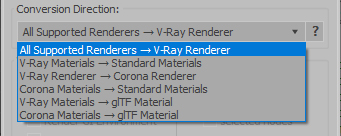
- Standard (Default Scanline)
- Corona Render
- FStorm Render
- Octane Renderer
- finalRender
- Arnold
- Brazil_Advanced (RS v 1.2) material
- NVIDIA iray (unofficial) material.
- Standard / Physical / PBR / OpenPBR materials
- Corona Renderer
- glTF Material (3ds Max 2023 or later)
- Standard / Physical / PBR / OpenPBR materials
- glTF Material (3ds Max 2023 or later)
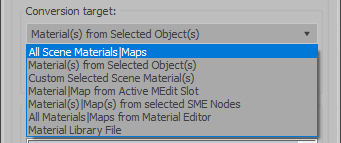
Full list of supported conversions.
Main features:
- Converts materials, maps, lights, cameras, modifiers, helpers and GI environment from other render engines to V-Ray and from V-Ray to Corona
- Converts clouds from CoronaSky to VRaySun and vice versa.
- Converts Night Sky system (Moon, Stars & Milky Way) from V-Ray to Corona and vice versa
- Converts Render Elements to V-Ray (currently supported Scanline RE, Corona RE, FStorm RE, Octane RE) and from V-Ray to Corona
- Converts V-Ray and Corona materials to Standard (Default Scanline) materials
- Converts VRayMtl and CoronaPhysicalMtl materials to Physical Material and OpenPBR Material
- Converts V-Ray and Corona materials to glTF Material (which is necessary for exporting to the .glb for corresponding 3d software: Blender, Gestaltor, Babylon.JS etc).
- Converts proxies (currently supported from Corona, FStorm, Octane) to V-Ray Proxy (static and animated)
- Converts V-Ray Proxy to Corona Proxy (static and animated)
- Converts standard Bitmaps to VRayBitmap and vice versa
- Converts standard Bitmaps to CoronaBitmap and vice versa
- Converts 3ds Max Physical cameras to V-Ray Physical cameras and vice versa
- Automatic configure ACEScg workflow in V-Ray
- Batch processing for multiple 3dsMax Scene (*.max) or 3dsMax Material Library (*.mat) files
- Programmatically interact with most converter functions using built-in maxscript methods (API), which allows you to use the converter without UI and in combination with other 3rd-party scripts.
- ...and more additional tools for fixing and adjusting the scene.
More detailed information about the all features and capabilities of the "V-RayMax Converter PRO" can be found here: https://maxtools.3dzver.com/product?id=1
Also, on this V-RayMax Converter telegram channel, you can read about all the updates.
IMPORTANT: To convert between different rendering engines, it is necessary that these rendering engines are installed (alpha/beta/dailybuilds/rc versions are not supported).
PS: Please, respect the developers and other users - do not post promotional messages in comments (ie spam).
If you have any suggestions or comments related to the work of the plugin, use the support form at this webpage: https://maxtools.3dzver.com/mxtsupport
- Scripts
- ACEScg
- autodesk material to vray material
- brazil
- conversion
- convert render elements
- converter
- converting
- Corona
- corona to standard
- corona to vray
- finalrender
- iRay
- Material
- Material Converter
- material converting
- PBR
- Physical
- renderer
- revit
- sRGB
- standard to vray
- v-ray
- VRay
- vray material converter
- vray to corona
- vray to standard
- vray to standard material
Comments
3ds max 2015
followed the instructions, still doesn't show up in the Customize User interface folder
I have to admit, i'm pretty frustrated with this program, went through a number of posts for a solution and nothing works.
Please refine the instructions so that this will work in the future.
Error not found "vmc_logos-mse"
note
Installation in max 2015
installation path: "c: \ Program Files \ Autodesk \ 3ds Max 2015 \ scripts"
the program does this installation:
"c: \ Program Files \ Autodesk \ 3ds Max 2015 \ scripts \ scripts \ 3DZverTools \ VrayMtlConverter \"
if you run "VrayMtlConverter_v25.mse"
by error not found "vmc_logos-mse"
solution
change the path so:
"c: \ Program Files \ Autodesk \ 3ds Max 2015 \ scripts \ 3DZverTools \ VrayMtlConverter \"
Almost there in 2015
I've downloaded and saved the file in max 2015 C:\Program Files\Autodesk\3dsmax2015\scripts
It doesn't show up in my customize dialog so I tried running the file in MAXScript and I get an error- can't find include file vmc_logos.mse
Not sure how to make it see that file but it's in the same folder.
Can anyone help me out on this?
Thanks
Works in 2014-64
It works for me in 2014
Just look for the actual script...
C:\Program Files\Autodesk\3ds Max 2014\scripts\3DZverTools\VRayMtlConverter
Run it as opposed to using the interface method. Seems to work fine and does a decent job converting too. Thanks to the script writer.
It works in Max 2015?
(Great script ... used in max 2009 ..
It works in Max 2015?
Played over the comments ...
thank you.
Update it!
Doesn´t work in Max 2014 64bit. And it doesn't show also in "Customize dialog".
Well. need to find other..
Thanks anyway.
How to get it to showup in your customize dialogue in 2013
I messed around with it a bit having the same issue of it not showing up. I think what I did was run the 3DZverTools-VRayMtlConverter25.mcr (located in D:\Program Files\Autodesk\3ds Max 2013\usermacros folder) with maxscript after installing. Then I was able to see 3dzvertools in my customize user interface/menu dropdown. If the file is not there move it to there and relaunch max. I've noticed some issues getting older scripts to work and sometimes it is because they install their macros to the ui/macroscripts folder as it worked prior to 2013. Your macros should be in the usermacros folder for most scripts.
Update. As I have gone through reconfiguring my max I've noticed that a lot of scripts need you to run their macro (.mcr file) once through the maxscript even with an installer unlike earlier versions of max.
Thanks ANDDNA! It works in
Thanks ANDDNA! It works in 3ds Max Design 2013 for me!
This is my website: http://www.citypixels.be
unable to see
does this work in 3ds max design 2014, and it also shows error like logo not found,
kindly update it to max 2014 and check for the error
Works in Max Design 2013
This script works in 2013, but does not show up in the Customize dialog.
-Install to your 3DS Max root dir.
-Launch Max, go to MAXScript>Run Script...
-Browse to \Autodesk\3ds Max Design 2013\scripts\3DZverTools\VRayMtlConverter
-Run "VRayMtlConverter_v25.mse"
-Convert Materials.
Anyone know how to make a toolbar button to launch an encrypted script?