
V-RayMax Converter PRO

V-RayMax Converter PRO is the best tool for convert 3d scene (materials, maps, lights, cameras, proxies, modifiers, helpers, render elements, etc.) from other render engines to V-Ray and from V-Ray to Corona Renderer, and also for converting V-Ray and Corona materials to Standard|Physical|PBR|OpenPBR materials and to glTF Material.
Current version: 4.0062
Supported for conversion: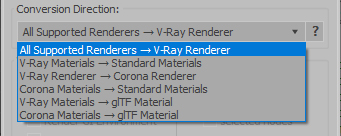
- Standard (Default Scanline)
- Corona Render
- FStorm Render
- Octane Renderer
- finalRender
- Arnold
- Brazil_Advanced (RS v 1.2) material
- NVIDIA iray (unofficial) material.
- Standard / Physical / PBR / OpenPBR materials
- Corona Renderer
- glTF Material (3ds Max 2023 or later)
- Standard / Physical / PBR / OpenPBR materials
- glTF Material (3ds Max 2023 or later)
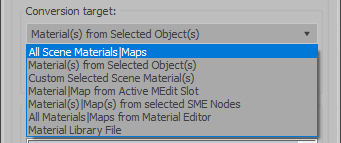
Full list of supported conversions.
Main features:
- Converts materials, maps, lights, cameras, modifiers, helpers and GI environment from other render engines to V-Ray and from V-Ray to Corona
- Converts clouds from CoronaSky to VRaySun and vice versa.
- Converts Night Sky system (Moon, Stars & Milky Way) from V-Ray to Corona and vice versa
- Converts Render Elements to V-Ray (currently supported Scanline RE, Corona RE, FStorm RE, Octane RE) and from V-Ray to Corona
- Converts V-Ray and Corona materials to Standard (Default Scanline) materials
- Converts VRayMtl and CoronaPhysicalMtl materials to Physical Material and OpenPBR Material
- Converts V-Ray and Corona materials to glTF Material (which is necessary for exporting to the .glb for corresponding 3d software: Blender, Gestaltor, Babylon.JS etc).
- Converts proxies (currently supported from Corona, FStorm, Octane) to V-Ray Proxy (static and animated)
- Converts V-Ray Proxy to Corona Proxy (static and animated)
- Converts standard Bitmaps to VRayBitmap and vice versa
- Converts standard Bitmaps to CoronaBitmap and vice versa
- Converts 3ds Max Physical cameras to V-Ray Physical cameras and vice versa
- Automatic configure ACEScg workflow in V-Ray
- Batch processing for multiple 3dsMax Scene (*.max) or 3dsMax Material Library (*.mat) files
- Programmatically interact with most converter functions using built-in maxscript methods (API), which allows you to use the converter without UI and in combination with other 3rd-party scripts.
- ...and more additional tools for fixing and adjusting the scene.
More detailed information about the all features and capabilities of the "V-RayMax Converter PRO" can be found here: https://maxtools.3dzver.com/product?id=1
Also, on this V-RayMax Converter telegram channel, you can read about all the updates.
IMPORTANT: To convert between different rendering engines, it is necessary that these rendering engines are installed (alpha/beta/dailybuilds/rc versions are not supported).
PS: Please, respect the developers and other users - do not post promotional messages in comments (ie spam).
If you have any suggestions or comments related to the work of the plugin, use the support form at this webpage: https://maxtools.3dzver.com/mxtsupport
- Scripts
- ACEScg
- autodesk material to vray material
- brazil
- conversion
- convert render elements
- converter
- converting
- Corona
- corona to standard
- corona to vray
- finalrender
- iRay
- Material
- Material Converter
- material converting
- PBR
- Physical
- renderer
- revit
- sRGB
- standard to vray
- v-ray
- VRay
- vray material converter
- vray to corona
- vray to standard
- vray to standard material
Comments
Hi All! At present I
Hi All!
At present I actively work above the new version of my script
VRayMtlConverter (version 3.0)! For everyone to whom it is necessary also who often
to them uses, it will be valid very good assistant in daily work!
Watch news!
Hi, Whats the status of
Hi,
Whats the status of the material converter script. I have some brazil stuff I'd like to convert to vray 1.5rc3 materials.
thanks,
Vance Miller
Hey, Jonasa... I'm just
Hey, Jonasa... I'm just coming back to scriptspot webpage... I'm afraid to say that VRayMtlConverter v2 doesn't work on the new RC version of VRay... and even worst if you jump to MAX 9... I'm rellly needing an update of this script...
I love this script - and has
I love this script - and has been using it in the past... BUT, I can't get this version to work. Can anyone confirm if this works with Max8 and Vray 1.5RC3. I'm getting a MaxScript exception: "No "">"" function for undefined