
V-RayMax Converter PRO

V-RayMax Converter PRO is the best tool for convert 3d scene (materials, maps, lights, cameras, proxies, modifiers, helpers, render elements, etc.) from other render engines to V-Ray and from V-Ray to Corona Renderer, and also for converting V-Ray and Corona materials to Standard|Physical|PBR|OpenPBR materials and to glTF Material.
Current version: 4.0062
Supported for conversion: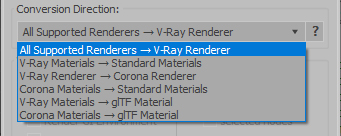
- Standard (Default Scanline)
- Corona Render
- FStorm Render
- Octane Renderer
- finalRender
- Arnold
- Brazil_Advanced (RS v 1.2) material
- NVIDIA iray (unofficial) material.
- Standard / Physical / PBR / OpenPBR materials
- Corona Renderer
- glTF Material (3ds Max 2023 or later)
- Standard / Physical / PBR / OpenPBR materials
- glTF Material (3ds Max 2023 or later)
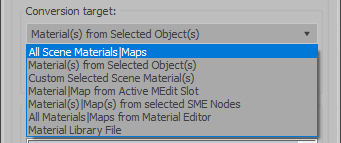
Full list of supported conversions.
Main features:
- Converts materials, maps, lights, cameras, modifiers, helpers and GI environment from other render engines to V-Ray and from V-Ray to Corona
- Converts clouds from CoronaSky to VRaySun and vice versa.
- Converts Night Sky system (Moon, Stars & Milky Way) from V-Ray to Corona and vice versa
- Converts Render Elements to V-Ray (currently supported Scanline RE, Corona RE, FStorm RE, Octane RE) and from V-Ray to Corona
- Converts V-Ray and Corona materials to Standard (Default Scanline) materials
- Converts VRayMtl and CoronaPhysicalMtl materials to Physical Material and OpenPBR Material
- Converts V-Ray and Corona materials to glTF Material (which is necessary for exporting to the .glb for corresponding 3d software: Blender, Gestaltor, Babylon.JS etc).
- Converts proxies (currently supported from Corona, FStorm, Octane) to V-Ray Proxy (static and animated)
- Converts V-Ray Proxy to Corona Proxy (static and animated)
- Converts standard Bitmaps to VRayBitmap and vice versa
- Converts standard Bitmaps to CoronaBitmap and vice versa
- Converts 3ds Max Physical cameras to V-Ray Physical cameras and vice versa
- Automatic configure ACEScg workflow in V-Ray
- Batch processing for multiple 3dsMax Scene (*.max) or 3dsMax Material Library (*.mat) files
- Programmatically interact with most converter functions using built-in maxscript methods (API), which allows you to use the converter without UI and in combination with other 3rd-party scripts.
- ...and more additional tools for fixing and adjusting the scene.
More detailed information about the all features and capabilities of the "V-RayMax Converter PRO" can be found here: https://maxtools.3dzver.com/product?id=1
Also, on this V-RayMax Converter telegram channel, you can read about all the updates.
IMPORTANT: To convert between different rendering engines, it is necessary that these rendering engines are installed (alpha/beta/dailybuilds/rc versions are not supported).
PS: Please, respect the developers and other users - do not post promotional messages in comments (ie spam).
If you have any suggestions or comments related to the work of the plugin, use the support form at this webpage: https://maxtools.3dzver.com/mxtsupport
- Scripts
- ACEScg
- autodesk material to vray material
- brazil
- conversion
- convert render elements
- converter
- converting
- Corona
- corona to standard
- corona to vray
- finalrender
- iRay
- Material
- Material Converter
- material converting
- PBR
- Physical
- renderer
- revit
- sRGB
- standard to vray
- v-ray
- VRay
- vray material converter
- vray to corona
- vray to standard
- vray to standard material
Comments
New update v3.9992 are available!
Release notes v3.9992:
Re: 3DS Max 2022
Thanks for the feedback!
Today we have released a new update 3.9991 with 3dsMax 2022 support.
All official users can download the update at any time on this web page: https://maxtools.3dzver.ru/dlupdate
New update v3.9991 are available!
Release notes v3.9991:
3DS Max 2022
Hello;
Your script is really a nice tool. I switched to Max 2022 but the VRay Mtl Converter doesn't launch. I could execute the mzp with apperently no issue, i even installed the button in my toolbar but nothing happens.
Probably you need an update for Max 2022
Thnka
Daniel
Daniel Diligent
New update v3.999 are available
v3.999:
Script v3.99 stopped to work after recent Windows 10 .NET update
Script v3.99 stopped to work after recent Windows 10 .NET update I installed on 01/12/21. Could you check this, please?
I have other scripts which also stopped to work.
UPDATE: I have installed latest Windows 10 build 20H2 and everything works fine again. Excuse me for the false alarm.
New update v3.998 are available!
v3.998:
New update v3.997
"V-RayMtl Converter 3" updated to v3.997:
New update v3.996
"V-RayMtl Converter 3" updated to v3.996:
- added transfer of Diffuse color animation keys from source material to target material (currently support for Standard, Raytrace, Architectural, CoronaMtl, CoronaLightMtl, VrayMtl and VrayLightMtl)
- fix gamma handling when converting CoronaBitmap texturemap to VrayBitmap (VrayHDRI)
- optimized loading of script and added loading bar
- improved handling of unexpected errors that may occur during material conversion
Your statements are unproven.
Give please examples of incorrect conversion Blend material to VRayBlendMtl.
Most likely you are using a hacked version that walks on pirated sites? But does anyone need to explain what the use of hacked software is fraught with ;)
None of the existing converters can provide you with 100% conversion accuracy (maximum 50%), but V-RayMtl Converter guarantees at least 90% conversion accuracy for all supported materials..
PS: Also, if you are an official user and have any questions or have any suggestions for improving the performance of V-RayMtl Converter, then you can always contact support at this web page: https://maxtools.3dzver.ru/support
or write to this email address: [email protected]
Our support team always responds to each user and quickly fixes all bugs and makes the necessary improvements to the script.