
V-RayMax Converter PRO

V-RayMax Converter PRO is the best tool for convert 3d scene (materials, maps, lights, cameras, proxies, modifiers, helpers, render elements, etc.) from other render engines to V-Ray and from V-Ray to Corona Renderer, and also for converting V-Ray and Corona materials to Standard|Physical|PBR|OpenPBR materials and to glTF Material.
Current version: 4.0062
Supported for conversion: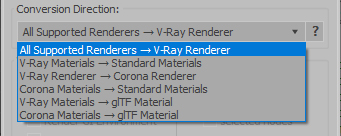
- Standard (Default Scanline)
- Corona Render
- FStorm Render
- Octane Renderer
- finalRender
- Arnold
- Brazil_Advanced (RS v 1.2) material
- NVIDIA iray (unofficial) material.
- Standard / Physical / PBR / OpenPBR materials
- Corona Renderer
- glTF Material (3ds Max 2023 or later)
- Standard / Physical / PBR / OpenPBR materials
- glTF Material (3ds Max 2023 or later)
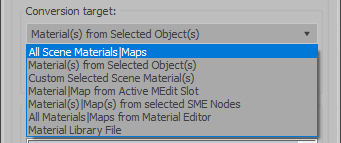
Full list of supported conversions.
Main features:
- Converts materials, maps, lights, cameras, modifiers, helpers and GI environment from other render engines to V-Ray and from V-Ray to Corona
- Converts clouds from CoronaSky to VRaySun and vice versa.
- Converts Night Sky system (Moon, Stars & Milky Way) from V-Ray to Corona and vice versa
- Converts Render Elements to V-Ray (currently supported Scanline RE, Corona RE, FStorm RE, Octane RE) and from V-Ray to Corona
- Converts V-Ray and Corona materials to Standard (Default Scanline) materials
- Converts VRayMtl and CoronaPhysicalMtl materials to Physical Material and OpenPBR Material
- Converts V-Ray and Corona materials to glTF Material (which is necessary for exporting to the .glb for corresponding 3d software: Blender, Gestaltor, Babylon.JS etc).
- Converts proxies (currently supported from Corona, FStorm, Octane) to V-Ray Proxy (static and animated)
- Converts V-Ray Proxy to Corona Proxy (static and animated)
- Converts standard Bitmaps to VRayBitmap and vice versa
- Converts standard Bitmaps to CoronaBitmap and vice versa
- Converts 3ds Max Physical cameras to V-Ray Physical cameras and vice versa
- Automatic configure ACEScg workflow in V-Ray
- Batch processing for multiple 3dsMax Scene (*.max) or 3dsMax Material Library (*.mat) files
- Programmatically interact with most converter functions using built-in maxscript methods (API), which allows you to use the converter without UI and in combination with other 3rd-party scripts.
- ...and more additional tools for fixing and adjusting the scene.
More detailed information about the all features and capabilities of the "V-RayMax Converter PRO" can be found here: https://maxtools.3dzver.com/product?id=1
Also, on this V-RayMax Converter telegram channel, you can read about all the updates.
IMPORTANT: To convert between different rendering engines, it is necessary that these rendering engines are installed (alpha/beta/dailybuilds/rc versions are not supported).
PS: Please, respect the developers and other users - do not post promotional messages in comments (ie spam).
If you have any suggestions or comments related to the work of the plugin, use the support form at this webpage: https://maxtools.3dzver.com/mxtsupport
- Scripts
- ACEScg
- autodesk material to vray material
- brazil
- conversion
- convert render elements
- converter
- converting
- Corona
- corona to standard
- corona to vray
- finalrender
- iRay
- Material
- Material Converter
- material converting
- PBR
- Physical
- renderer
- revit
- sRGB
- standard to vray
- v-ray
- VRay
- vray material converter
- vray to corona
- vray to standard
- vray to standard material
Comments
no even 50%
Useless for us. The blend amounts of Vray Blend Materials are wrong. This tool does not offer a 100% solution. Corona 5 -> Vray 3.6
All the detailed information
All the detailed information about V-RayMtl Converter you can find on the official web page: https://maxtools.3dzver.ru/vmc
Also there you will find the answer to your question.
Lossless conversion?
Specifically, is the conversion path (VRay -> Standard -> VRay) lossless?
Thank you!
Thank you for your words. We are constantly working to improve our tool and your feedback is very important and pleasant to us. Good luck and great creative work!
Magnificent tool
Thank you so much mate for this magnificent, the most complete vray converter on the market.
I know so well how much effort requires to create thousands of accurate connections between different parameters so i'm waiting for incoming major update to purchase.
Thanks again for your efforts, i really appreciate it!
Most likely your
Most likely configuration of your computer is constantly changing or you trying to run plugin on another computer, not on the one on which you activated the license.
Please write about your problem to [email protected] (support service) and they will help you.
I also highly recommend that you install the latest version. You can download the latest version by following this address: https://maxtools.3dzver.ru/dlupdate
License error
Hi,
I am just wondering why do I always receive this error everyday? I have to re-activate my license to use this plugin on a daily basis. By the way, I am still using windows7.
Please help.
http://prntscr.com/ls7oy2
you are funny!
so you write this in your text: PS: Please, respect the developers and other users - do not post promotional messages in comments (ie spam). If you have any suggestions or comments related to the work of the plugin, use the support form at this webpage: https://maxtools.3dzver.ru/support
But you do spam in other scripts comments? Not what I call playing fair, but good luck to you!
Thank you
It works! You saved my project!
This could have been done,
This could have been done, but material such as VrayDisplacementMTL does not exist in V-Ray. Sorry.