
V-RayMax Converter PRO

V-RayMax Converter PRO is the best tool for convert 3d scene (materials, maps, lights, cameras, proxies, modifiers, helpers, render elements, etc.) from other render engines to V-Ray and from V-Ray to Corona Renderer, and also for converting V-Ray and Corona materials to Standard|Physical|PBR|OpenPBR materials and to glTF Material.
Current version: 4.0062
Supported for conversion: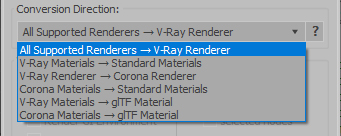
- Standard (Default Scanline)
- Corona Render
- FStorm Render
- Octane Renderer
- finalRender
- Arnold
- Brazil_Advanced (RS v 1.2) material
- NVIDIA iray (unofficial) material.
- Standard / Physical / PBR / OpenPBR materials
- Corona Renderer
- glTF Material (3ds Max 2023 or later)
- Standard / Physical / PBR / OpenPBR materials
- glTF Material (3ds Max 2023 or later)
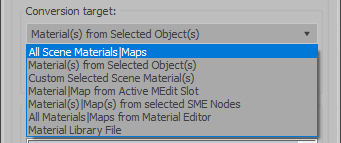
Full list of supported conversions.
Main features:
- Converts materials, maps, lights, cameras, modifiers, helpers and GI environment from other render engines to V-Ray and from V-Ray to Corona
- Converts clouds from CoronaSky to VRaySun and vice versa.
- Converts Night Sky system (Moon, Stars & Milky Way) from V-Ray to Corona and vice versa
- Converts Render Elements to V-Ray (currently supported Scanline RE, Corona RE, FStorm RE, Octane RE) and from V-Ray to Corona
- Converts V-Ray and Corona materials to Standard (Default Scanline) materials
- Converts VRayMtl and CoronaPhysicalMtl materials to Physical Material and OpenPBR Material
- Converts V-Ray and Corona materials to glTF Material (which is necessary for exporting to the .glb for corresponding 3d software: Blender, Gestaltor, Babylon.JS etc).
- Converts proxies (currently supported from Corona, FStorm, Octane) to V-Ray Proxy (static and animated)
- Converts V-Ray Proxy to Corona Proxy (static and animated)
- Converts standard Bitmaps to VRayBitmap and vice versa
- Converts standard Bitmaps to CoronaBitmap and vice versa
- Converts 3ds Max Physical cameras to V-Ray Physical cameras and vice versa
- Automatic configure ACEScg workflow in V-Ray
- Batch processing for multiple 3dsMax Scene (*.max) or 3dsMax Material Library (*.mat) files
- Programmatically interact with most converter functions using built-in maxscript methods (API), which allows you to use the converter without UI and in combination with other 3rd-party scripts.
- ...and more additional tools for fixing and adjusting the scene.
More detailed information about the all features and capabilities of the "V-RayMax Converter PRO" can be found here: https://maxtools.3dzver.com/product?id=1
Also, on this V-RayMax Converter telegram channel, you can read about all the updates.
IMPORTANT: To convert between different rendering engines, it is necessary that these rendering engines are installed (alpha/beta/dailybuilds/rc versions are not supported).
PS: Please, respect the developers and other users - do not post promotional messages in comments (ie spam).
If you have any suggestions or comments related to the work of the plugin, use the support form at this webpage: https://maxtools.3dzver.com/mxtsupport
- Scripts
- ACEScg
- autodesk material to vray material
- brazil
- conversion
- convert render elements
- converter
- converting
- Corona
- corona to standard
- corona to vray
- finalrender
- iRay
- Material
- Material Converter
- material converting
- PBR
- Physical
- renderer
- revit
- sRGB
- standard to vray
- v-ray
- VRay
- vray material converter
- vray to corona
- vray to standard
- vray to standard material
Comments
VraymtlDisplacement
Any chance to add on/off VrayDisplacementMTL?
Cheers
Thank you! We are glad that
Thank you! We are glad that our plugin was useful to you)
Thank you!
Thank you!
Thank you! We are glad that
Thank you! We are glad that our plugin was useful to you)
Great Plugin, great price
Just purchased your "little" tool in the hope it would convert a Revit model to VRay while keeping all the used textures. The standard VRay convertor didn't work, at least not in Max2018. Purchase, download, installation and conversion didn't take more than 2 minutes. Now I have a perfect model I can work on. This is how all purchases should be. THANKS:)
This is the best script for
This is the best script for converting materials!
Thank you for a great tool for little money!
V-RayMtl Converter 3
Thank you!
Great script!
Great help to save time!
The script has been updated
The script has been updated for support 2013-2018
Yes, the script really converts V-Ray materials to standard
V-RayMtl Converter 3 converts the source materials into other specified material with the maximum possible preservation of the basic properties of the material, such as diffuse, specular, opacity (including filters), glossiness, specular, bump, displacement, selfillumination (emission), translucency, reflection, refraction. Also, all the textures that are used for the above parameters are saved. As for special procedural maps, they are converted only if there is an analogue. Otherwise, the procedural maps remain as they are or are deleted if the target materials do not support them. A full list of supported maps and materials for conversion can be seen here: http://maxtools.3dzver.ru/sc/vmc3_supportlist.txt
Thank you!
Great script for a little money!
It helped me to save time!